Truth Table Generator
Type a logic expression with AND, OR, NOT, XOR, → or ↔ and get its complete truth table, step by step.
How to use the truth table generator
- Under “What to do”, choose a mode: Truth table for one expression, Compare two expressions to test whether two expressions match, or Check an argument for premises and a conclusion.
- Type your expression in the input box. Variables can be letters or words, such as A, p, x1 or rain. Case matters, so A and a are different variables.
- If you are unsure which symbol to type, use the buttons under the input. They insert ¬ ∧ ∨ ⊕ → ↔ ↑ ↓ ( ).
- Set the options you need: Show values as (1 and 0, or T and F), Row order (0 first, or 1 first as in logic textbooks), Variable order (as they appear, or alphabetical), Show a column for every sub-expression, and Highlight the rows that matter.
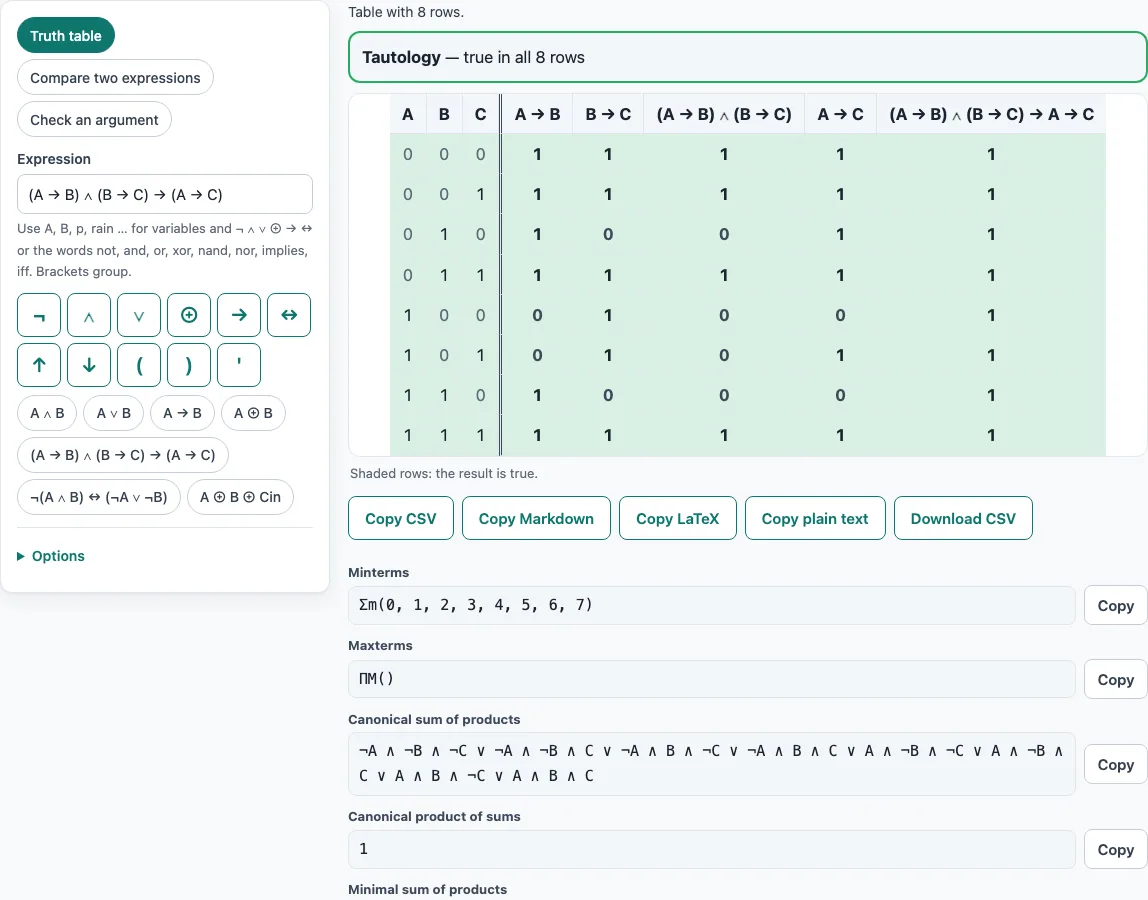
- Read the table, then the results under it: Tautology, Contradiction or Contingent, with the number of true rows; minterms and maxterms; canonical and minimal forms; and a Karnaugh map for 2 to 4 variables.
- In compare mode, enter both expressions. In argument mode, enter one premise per line, then the conclusion. The presets Modus ponens, Modus tollens, Affirming the consequent and Hypothetical syllogism load example arguments you can edit.
To use the table elsewhere, choose Copy CSV, Copy Markdown, Copy LaTeX, Copy plain text or Download CSV. Print, or Save as PDF, prints the table. The address keeps your expression, so Copy link shares it exactly as you typed it.
How do you make a truth table step by step?
A truth table lists every possible combination of true and false values for the variables in an expression, then shows the result for each combination. With n variables there are 2^n rows, so two variables give 4 rows and three give 8. Write the rows by counting in binary, starting from all zeros.
To fill in the table by hand, add one column for each sub-expression, working from the inside out, and make the last column the final result. Brackets come first, then the operators follow this order, tightest first: NOT, then AND (and NAND), then XOR, then OR (and NOR), then IMPLIES, then IF AND ONLY IF. So A ∨ B ∧ C means A ∨ (B ∧ C). IMPLIES groups from the right, so A → B → C means A → (B → C).
Take A → B as an example. It is false only when A is true and B is false, so the result column reads 1, 1, 0, 1 for the rows 00, 01, 10 and 11. The tool shows the same thing with the minterm list Σm(0, 1, 3) and the maxterm list ΠM(2).
What is a tautology or contradiction?
A tautology is an expression that is true in every row of its truth table. A contradiction is false in every row. An expression that is true in some rows and false in others is called contingent.
De Morgan’s law, ¬(A ∧ B) ↔ (¬A ∨ ¬B), is a tautology. The hypothetical syllogism (A → B) ∧ (B → C) → (A → C) is also a tautology, and its table has 8 rows, all true. By contrast, A ∧ ¬A is a contradiction, since it can never be true. The tool reports which of the three cases applies and how many rows are true. Tautologies matter because they are the laws of logic: an argument is valid exactly when “premises together imply the conclusion” is a tautology, which is what argument mode checks row by row.
Frequently asked questions
Is the truth table generator free, or do I need an account?
It is free, and you do not need an account or sign-up. Nothing needs to be installed, because the tool runs entirely in your web browser, and your expressions are not uploaded.
Does it work on a phone or tablet?
Because the tool runs in the browser, you can open it on a phone or tablet the same way you would on a computer. The input box, symbol buttons and results all appear on the page below the tool.
What symbols can I type?
You can type the operator symbols or their word and ASCII forms. NOT is ¬, !, ~ or “not”, or a prime after the variable, as in A’. AND is ∧, &, &&, *, · or “and”. OR is ∨, |, || or “or”, and + also works. XOR is ⊕, ^ or “xor”. NAND is ↑ or “nand”, and NOR is ↓ or “nor”. IMPLIES is →, ->, => or “implies”. IF AND ONLY IF is ↔, <->, <=>, ==, “iff” or “xnor”. Constants 0, 1, T, F, true and false are allowed.
How do you check if an argument is valid with a truth table?
Choose Check an argument, enter each premise on its own line, then enter the conclusion. The argument is valid if the conclusion is true in every row where all the premises are true. Modus ponens, with premises P → Q and P and conclusion Q, is valid. Affirming the consequent, with premises P → Q and Q and conclusion P, is invalid, and the tool lists its one counterexample: P false, Q true.
What do the minterms Σm and maxterms ΠM mean?
Minterms are the rows where the expression is true, and the Σm list gives their numbers: each row’s variable values read as a binary number, with the first variable as the highest digit. Maxterms are the rows where it is false, and the ΠM list numbers those. The two lists always split all the rows between them.
What does the “AB means A AND B” option do?
It switches the tool to Boolean algebra notation, where each letter is a single variable. With this option on, AB, A(B+C) and A’B are read as products, so you do not need to write ∧ between letters. Errors name the character position, which helps you find the mistake.
Related tools
- Number sequence solver: use it to find the rule behind a list of numbers.
- Knights and knaves puzzles: practise logic reasoning about truth-tellers and liars.
- Logic grid puzzles: work through puzzles that combine several clues into one answer.
- Math logic puzzles: try puzzles that rely on exact reasoning with numbers.
- Monty Hall simulator: test the famous probability problem by running many games.
- Logic puzzles with answers: print a pack of puzzles with worked solutions.
- Logic puzzles (home): browse all the logic puzzles on the site.