Scavenger Hunt Clues Generator
Choose where the hunt is and who plays, and get a chain of treasure hunt clues to print, each one leading to the next hiding place.
The Scavenger Hunt Generator builds a full scavenger hunt or treasure hunt with clues, and it runs free in your web browser. There is no sign-up and nothing to install, and nothing is uploaded. Each clue card points to the next hiding place, so the last card leads to the treasure. You can choose easy rhyming clues for young children, hard riddle-style clues for teens and adults, or a mix of both. Pick indoor, outdoor, classroom, office or party spots, add a Christmas, Easter, Birthday or Halloween theme if you like, then print the cards and an organizer sheet. It works for a home treasure hunt, a yard hunt, a classroom game or a party.
The clue cards are free to use for your own hunts or in products you sell, such as Etsy printable hunts.
How to use the Scavenger Hunt Generator
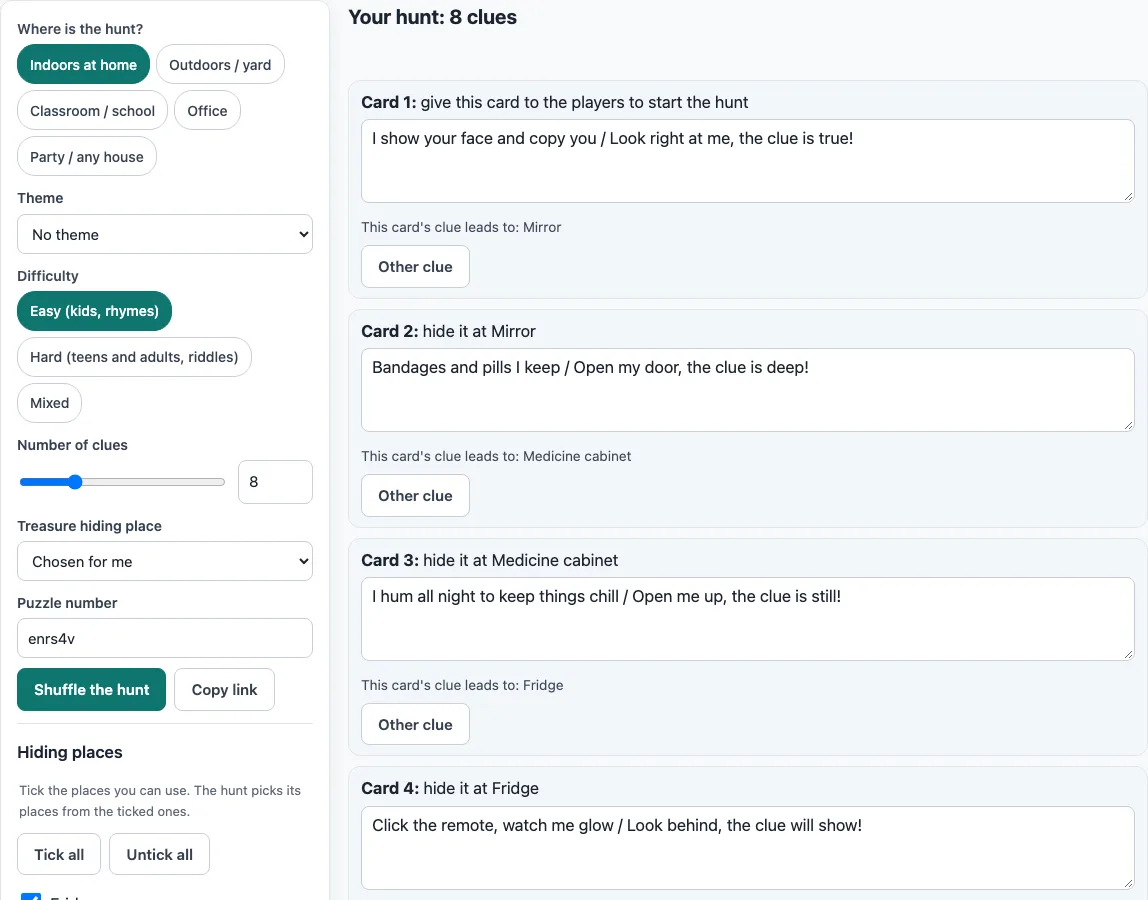
- Under Where is the hunt?, tick one or more of these: Indoors at home, Outdoors / yard, Classroom / school, Office, or Party / any house.
- Under Theme, choose No theme, Christmas, Easter, Birthday or Halloween. A theme adds themed hiding places, which are used first, plus a themed card title and border.
- Under Difficulty, choose Easy (kids, rhymes), Hard (teens and adults, riddles) or Mixed.
- Set Number of clues between 4 and 20. The maximum is capped by how many places you tick.
- In the Hiding places checklist, tick the spots you want. Use Tick all or Untick all to change them quickly. You can also use Add your own place with your own clue (up to 20).
- Under Treasure hiding place, choose one place or pick Chosen for me.
- Read through the chain of clue cards. Edit any clue, click Other clue to swap it for another clue for the same spot, or click Shuffle the hunt for a new order.
- Print the cards. Choose 4, 6 or 8 cards per page, tick Show card numbers if you want them, and tick Include the organizer sheet. Pick US Letter or A4.
Your edits are kept in the browser. The seed in the address makes the same hunt again, and Copy link shares it. Copy all clues copies the organizer list and clue texts as plain text, which is useful for a quick answer key.
How do you set up a treasure hunt with clues?
A treasure hunt is a chain of clue cards. Card 1 goes to the players to start, and every card’s clue describes where the next card is hidden, until the last place hides the treasure. The Organizer sheet lists the whole chain, starting with “Card 1: give this card to the players to start the hunt,” then “Card 2: hide it at <place 1>,” and so on, ending with “Treasure: hide it at
Hide each card yourself just before the hunt, in the order the organizer sheet gives. Keep card 1 for the start so you know where the hunt begins. No clue names its own place, so players have to solve each clue to find the next spot. The easy clues rhyme, which suits young children. For example, the fridge clue reads: “I keep the milk and juice so cold / Open my door, your next clue I hold!” The hard clues are riddles that describe the place without naming it. The hard fridge clue reads: “I hum all night and keep your lunch cold, and the next clue waits behind my door.” A hard mirror clue reads: “I reflect you back at yourself; the next clue is taped to my back, facing the wall.”
What are good hiding places for clues around the house?
Good hiding places are everyday objects that people naturally open, lift or look inside. The generator draws on 59 places. At home these include the fridge, freezer, bookshelf, couch, bed, pillow, piano, clock, laundry basket, pantry, rug and lamp. Outdoors it offers the mailbox, tree, swing, slide, doormat, garden hose, flower pot, bicycle, garage, bird feeder and sandbox. Classroom and office spots include the whiteboard, teacher’s desk, globe, printer, coffee maker and filing cabinet.
Places that get hot, such as the oven, toaster, grill and dryer, are left out on purpose, so no card is hidden there. For young children, choose places in one or two rooms so they can keep track of the chain. Mix a few obvious spots with a few less obvious ones to keep older players guessing. You can add your own place with its own clue, but the page warns you if the clue contains the place name, so check that the clue still hides it.
Frequently asked questions
How many clues should a scavenger hunt have?
Use about 6 to 10 clues for young children and 10 to 15 for older kids and adults. The generator allows from 4 to 20 clues, but the number is capped by how many hiding places you have ticked.
How do you make hard scavenger hunt clues for adults?
Set Difficulty to Hard (teens and adults, riddles). Each clue then describes its hiding place as a riddle without naming it. You can edit any clue before printing or click Other clue to swap it for a different one for the same spot.
Is the Scavenger Hunt Generator free, and do I need an account?
Yes, it is free and needs no sign-up. Everything runs in the web browser, nothing has to be installed, and nothing is uploaded.
Does it work on a phone or tablet?
It runs in the web browser with nothing to install, so there is no app to download. Open the page in the browser you already use, then follow the steps as you would on any page.
Can I print the clue cards?
Yes. Choose 4, 6 or 8 cards per page, and the cards include dashed cut lines. You can add card numbers and the organizer sheet, and print on US Letter or A4 paper.
Can I sell scavenger hunt clue cards on Etsy?
Yes. Clue cards you print are free for personal, classroom and commercial use, including Etsy printables, KDP activity books, Teachers Pay Teachers, paid events and print-on-demand. It is royalty-free and no credit is needed. The only thing you may not do is copy the generator or the site to run a competing service.
Related tools
- Riddles with answers: Use this when you want more riddles to write your own clues or check an answer.
- Rebus puzzles: Use this for picture-and-word puzzles that suit a mixed-age group.
- Brain teasers: Use this for short puzzles that work as a warm-up before a hunt.
- Lateral thinking puzzles: Use this when you want puzzles that reward unusual thinking, like hard clues.
- Logic puzzles for kids: Use this for simpler logic puzzles aimed at younger players.
- Logic puzzles with answers: Use this for a printable pack when you need puzzles and their answers in one place.
- Logic puzzles: Use this to browse the full set of puzzles on the home page.